

An on-chain withdrawal refers to transferring digital assets from your LBank account to another exchange platform or an external wallet address.
Before making an on-chain withdrawal, please make sure that the receiving platform or wallet supports the selected token and withdrawal network. Carefully verify the withdrawal address, network, and Memo/Tag (if required). Incorrect or mismatched information may result in permanent asset loss.
Withdrawal Fee Details
-
On-chain withdrawals require a withdrawal fee, which is paid by the sender to cover blockchain transfer and network processing costs.
-
When you submit a withdrawal, the system will automatically display the withdrawal fee and the estimated amount to be received based on the selected token and network. Fees may vary depending on the token and network, so please refer to the real-time information shown on the withdrawal page. The actual amount received is calculated as:
-
Actual amount received = Withdrawal amount - Withdrawal fee
-
If you want the recipient address to receive a specific amount, please review the fee and estimated received amount carefully before submitting your withdrawal request. This helps avoid receiving less than expected due to fee deductions.
-
Withdrawal fees may be adjusted based on network conditions. Please confirm the latest fee information before submission.
How-to Steps
Web
Access「Withdraw」
-
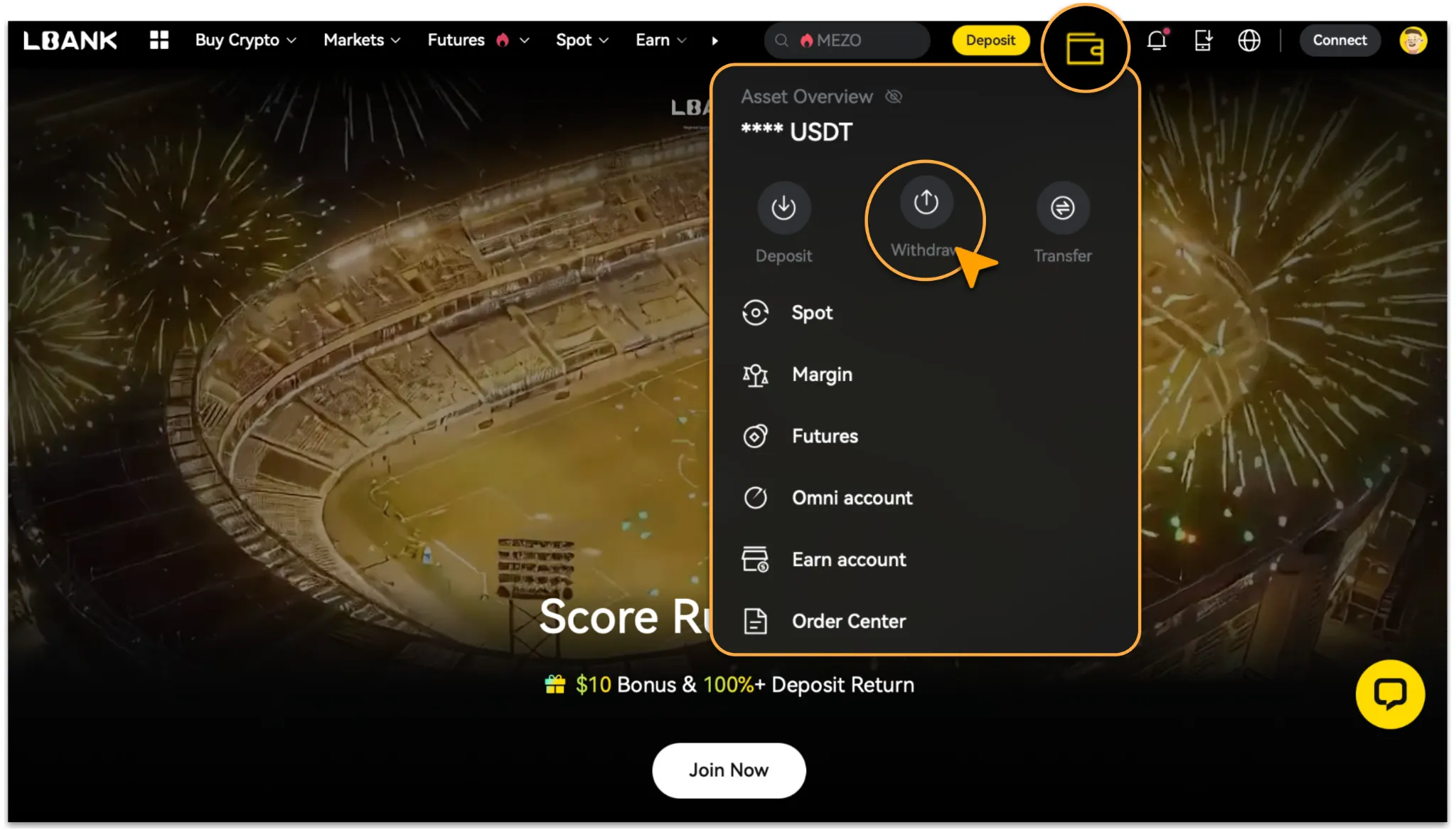
Log in to the LBank website and click「Asset > Withdraw」. If you have not enabled a security verification method, please complete the required security settings(enables 2FA) first to protect your account.
Enter Withdrawal Details
-
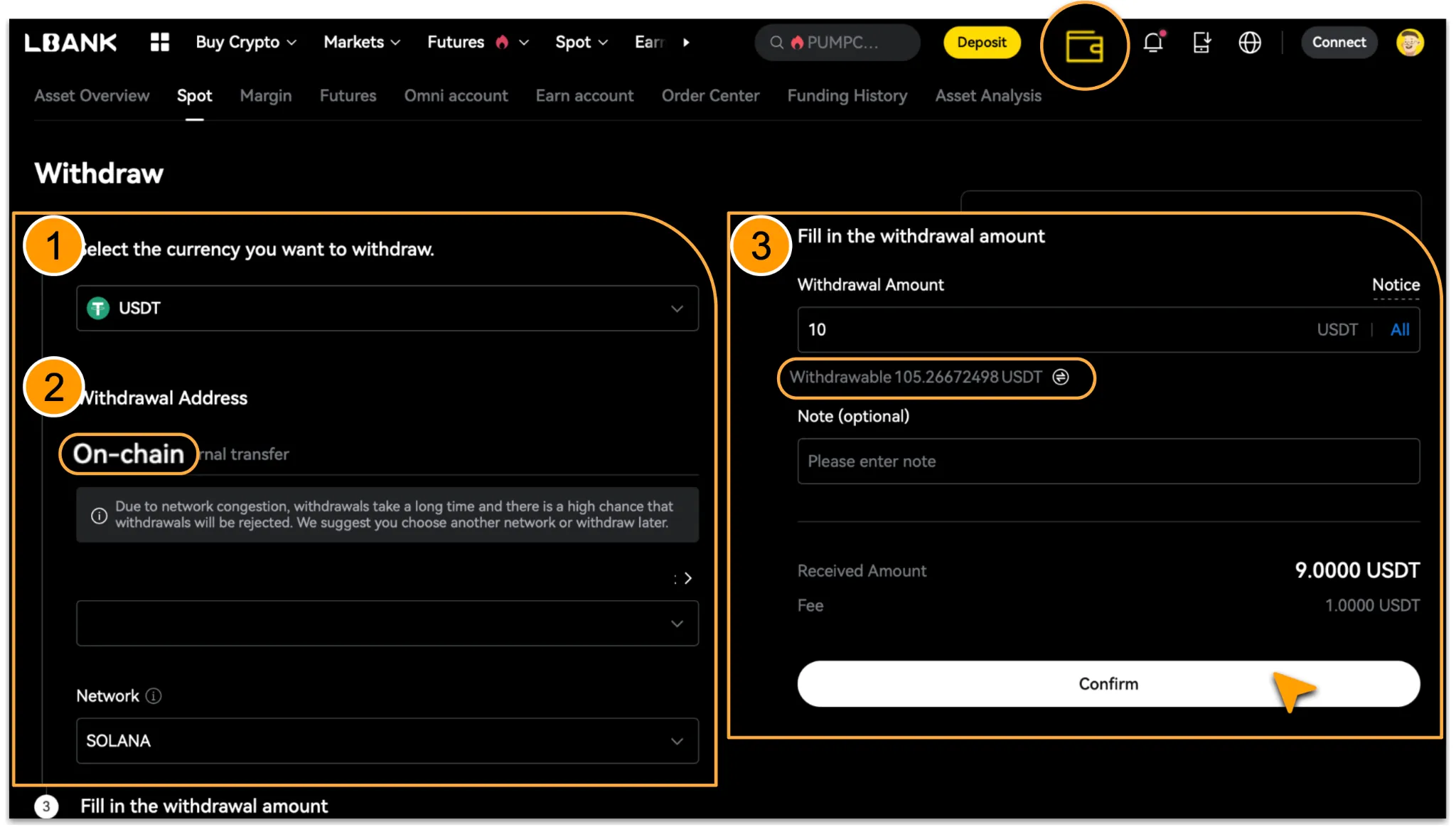
On the Withdrawal page, search for or select the token you want to withdraw.
-
Choose「On-chain」 Withdrawal, enter the withdrawal address, and select the correct withdrawal network.
-
If the receiving platform or wallet requires a Memo/Tag, enter it correctly as well.
-
Enter the withdrawal amount, review the fee and estimated amount to be received, then click Confirm. If your available withdrawal balance is insufficient, click「🔁 Available Balance」to transfer funds in and adjust your balance.
Complete security verification
-
Enter the email or SMS verification code and Google Authenticator code as prompted, then click「Confirm」to submit your request.
-
Once the system review is completed, your assets will be automatically sent to the on-chain address you entered.
App
Go to「Withdraw」
-
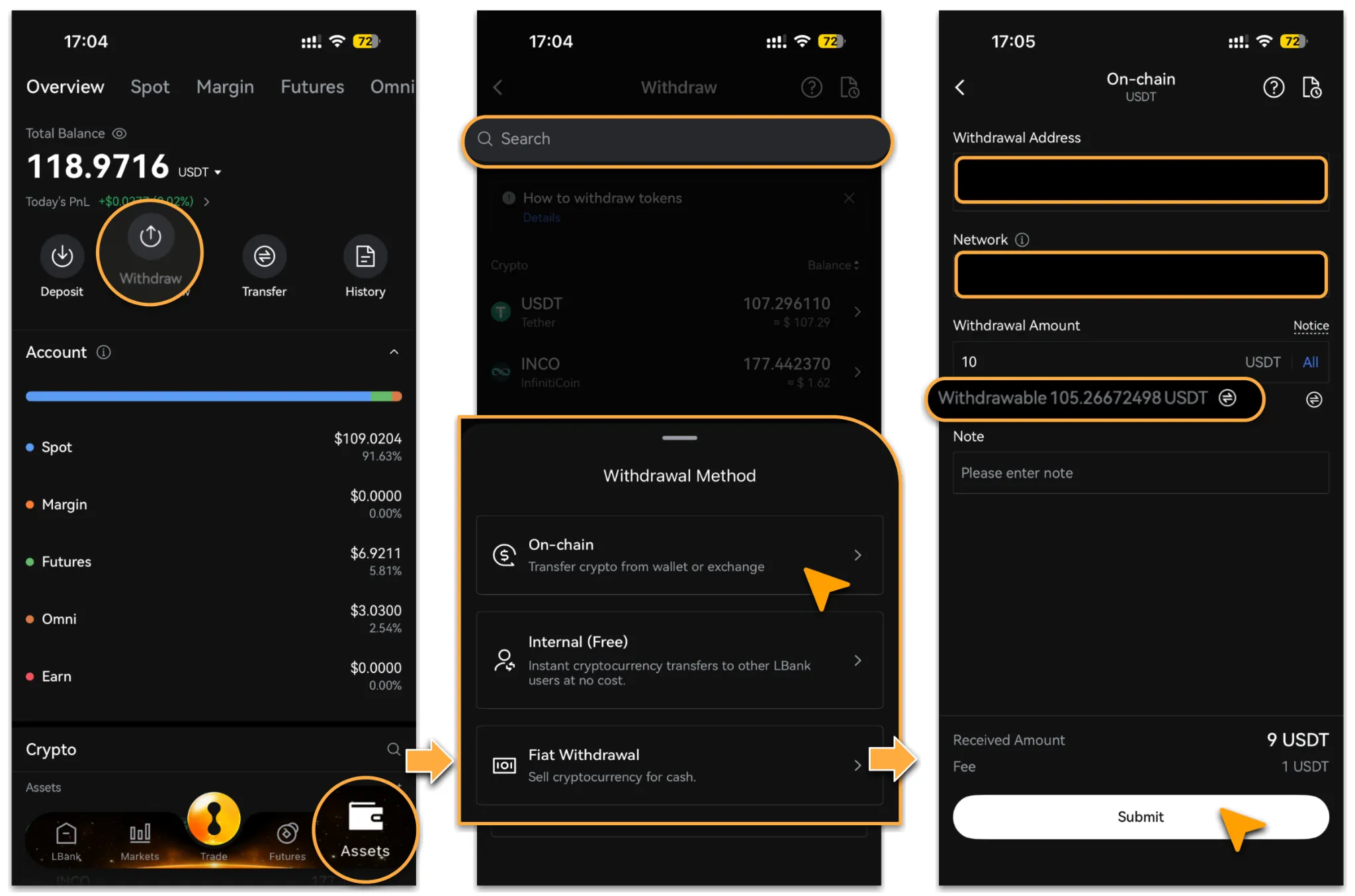
Log in to the LBank App and click「Asset > Withdraw」. If you have not enabled a security verification method, please complete the required security settings(enables 2FA) first to protect your account.
Enter Withdrawal Details
-
Search for or select the token you want to withdraw.
-
Choose「On-chain」 Withdrawal, enter the withdrawal address, and select the correct withdrawal network.
-
If the receiving platform or wallet requires a Memo/Tag, enter it correctly as well.
-
Enter the withdrawal amount, review the fee and estimated amount to be received, then click Confirm. If your available withdrawal balance is insufficient, click「🔁 Available Balance」to transfer funds in and adjust your balance.
Common On-Chain Withdrawal Scenarios
Withdraw to Another Exchange
-
Go to the「Deposit」session of the receiving platform, select the corresponding token and network, and copy the deposit address.
-
Return to the LBank withdrawal page, select the same token and network, and paste the receiving address.
-
Enter the withdrawal amount, review the fee and estimated amount to be received, then submit the request and wait for blockchain confirmation.
-
After the withdrawal is completed, check the receiving platform to confirm whether the deposit has been credited successfully.
Withdraw to an External Wallet
-
Open your wallet, select the corresponding network, and copy the receiving address.
-
Return to the LBank withdrawal page, select the same network, and paste the address.
-
Select the token and enter the withdrawal amount, review the fee and estimated amount to be received, then submit the request and wait for blockchain confirmation.
-
After the withdrawal is completed, check whether the assets have arrived in your wallet. If the wallet does not display the token, you may need to manually import the corresponding token contract address to view the assets.
Important Notes
-
Make sure the withdrawal token, wallet address, and network all match exactly. Otherwise, your assets may be lost.
-
If the recipient requires a Memo/Tag, make sure it is entered accurately. Missing or incorrect Memo/Tag information may cause the withdrawal to fail or prevent the assets from being credited properly.
-
Withdrawal fees vary depending on the token and network. Please refer to the information displayed on the withdrawal page.
-
The actual amount received is the amount after the withdrawal fee is deducted. Please review it carefully before submission.
-
After a withdrawal request is submitted, it must go through platform review and blockchain confirmation. The actual arrival time may be affected by network conditions.
Reminder
On-chain withdrawals involve several important details, including the withdrawal address, network, and blockchain fees. Please read the on-screen instructions carefully and make sure all information is correct before proceeding.
To protect your assets, we recommend reviewing all withdrawal details again before submission. If you have any questions, please contact LBank Customer Support.